Mastering AI Coding Agents: A Complete Guide to Architecture, Prompting, Skills, and MCP
March 13, 2026
Insights
While chatbots are fantastic conversational partners, interacting with an AI coding agent is a fundamentally different experience. Chatbots mirror your dialogue turn-by-turn. Agents, on the other hand, act. They execute commands, edit files, and navigate your codebase. However, without explicit instructions and clear success criteria, an autonomous agent can easily deviate from your intended goal.
As the team building Symbiotic Code, we’ve spent thousands of hours under the hood of these systems. In this guide, we’re pulling back the curtain to share the "internal recipe", the underlying architecture of AI coding agents, how they actually "think," and the precise strategies you need to get reliable, production-ready results.
Chatbots Provide Information, Agents Execute Tasks
The primary distinction between a chatbot and an agent lies in their level of autonomy. A chatbot is an advisory system: you ask a question or request a plan, the model processes it, and it returns a text-based response. The interaction ends there, leaving you responsible for manually implementing the suggested steps.
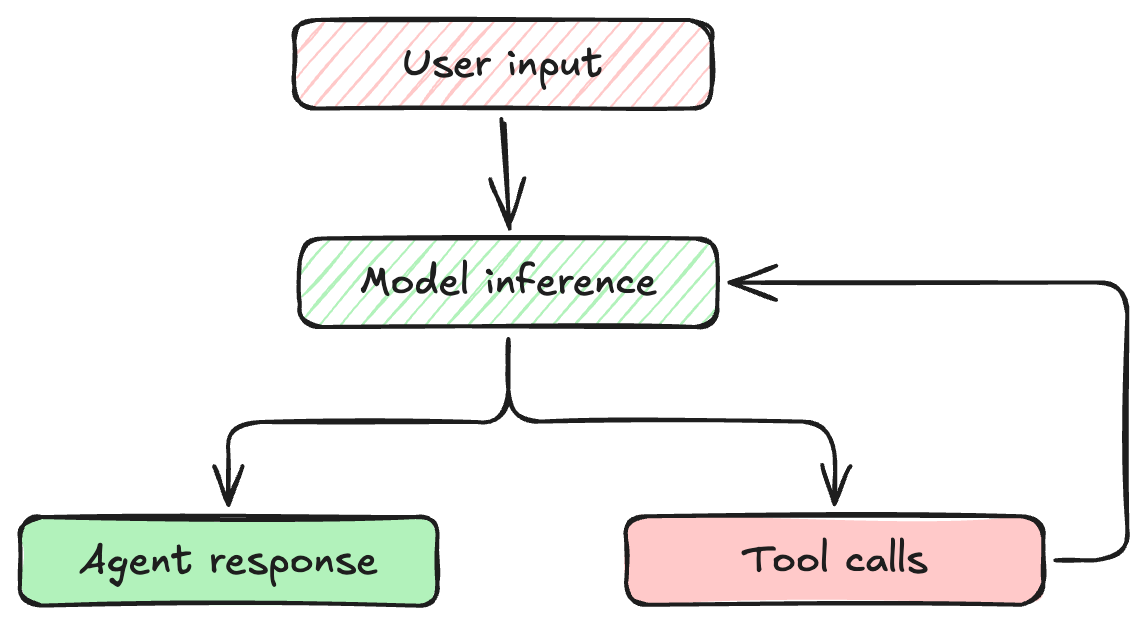
An agent, however, is an execution engine. You define an objective, and the agent takes control to accomplish it. Agents are designed to achieve complex, multi-step goals by interacting directly with your environment through tools (like terminal access, file system manipulation, or API calls), continuously observing the outcomes of their actions and iterating until the objective is fully resolved.
This loop means the AI isn't just generating text; it is actively evaluating the output of its actions and deciding what to do next.
How Agents Remember: The Expanding Context
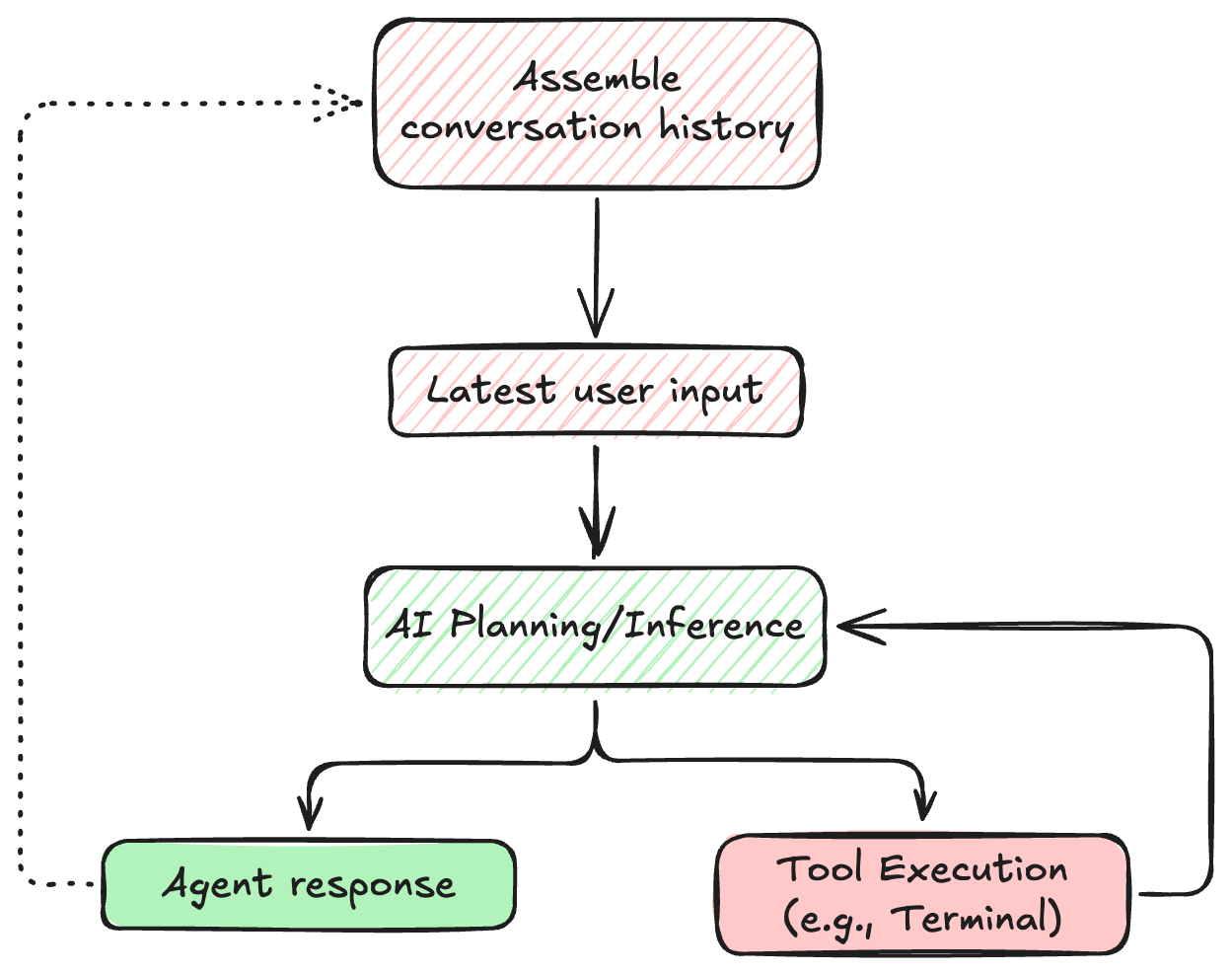
Every time an agent takes an action and observes the result, that interaction must be stored. Unlike humans, language models don't have persistent memory between turns. Instead, their "memory" is simply the entire history of the conversation, constantly appended and sent back to the model.
This growing context is why agents can remember a bug you mentioned five steps ago. However, it also means that context management is critical. If the agent makes hundreds of tool calls, it can exhaust its context window, losing track of the original goal.
The Hierarchy of Agent Prompts
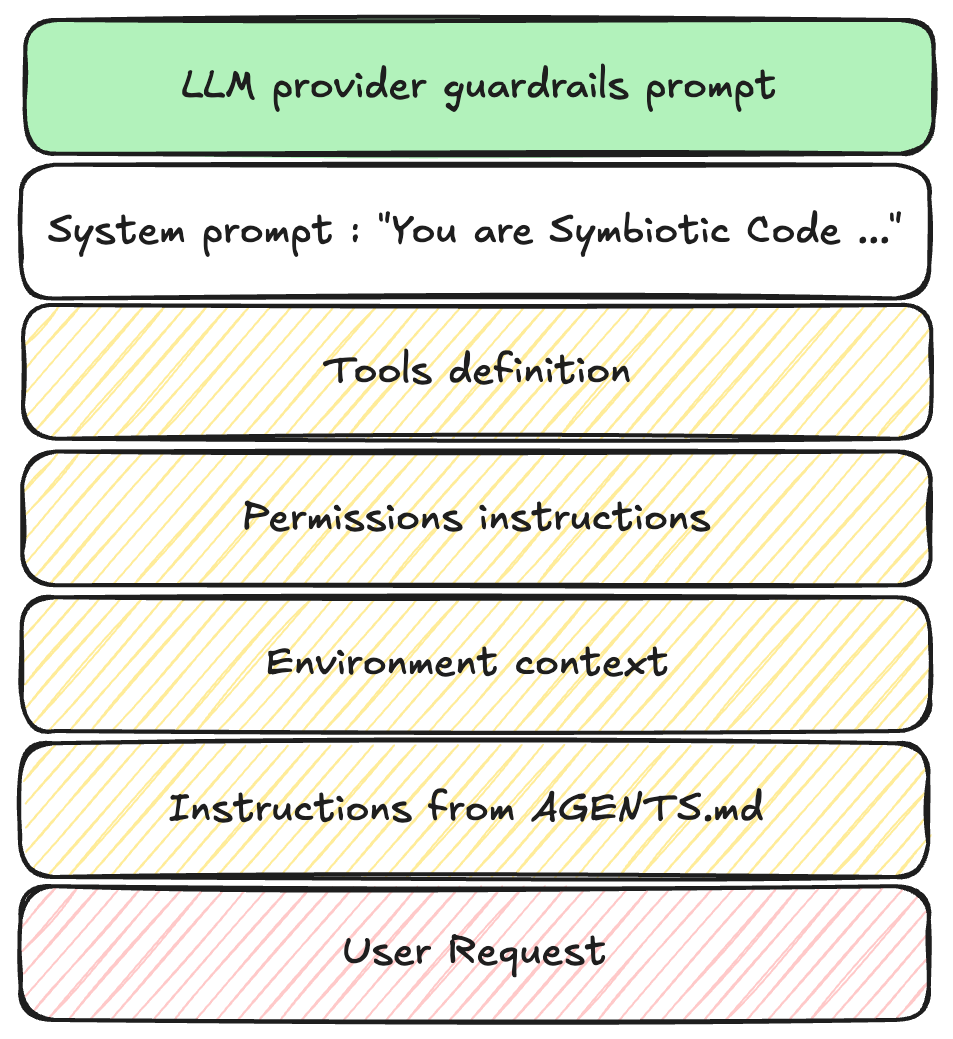
When you type a request into an agent, your words are just the tip of the iceberg. An agent's behavior is governed by a stack of instructions:
Platform Guardrails: The absolute foundational rules set by the model provider (e.g., OpenAI or Anthropic), preventing malicious or illegal behavior.
System Instructions (The Agent's Hardwiring): The hidden system prompt written by the agent's creators. This defines the agent's core identity, how it should format its internal thoughts, and how to use its tools safely.
Workspace Conventions: Project-level rules defined by the user (often in a .agentrules or similar markdown file in the repository root).
The User Request: Your immediate instruction (e.g., "Refactor the authentication middleware").
Tool Schemas: Low-level JSON definitions telling the agent exactly what inputs a specific tool expects.
Uncovering the System Prompt
You generally can't edit an agent's core system prompt, but understanding it helps explain AI behavior. System prompts usually contain:
Role Definition: "You are an expert Principal Engineer specializing in distributed systems..."
Tool Guardrails: Explicit examples of good and bad tool usage. For instance, instructing the agent to always run git status before attempting to stage files.
Opinionated Best Practices: Directives like, "Always use functional components in React," or "Prefer Tailwind CSS for styling."
When your agent stubbornly refuses to use a specific library, or formats code in a particular way, it is likely obeying its system prompt. Your goal as a user is to learn how to guide the agent within or around these constraints.
Proven Strategies for Prompting Agents
Because agents are autonomous, vague prompts lead to chaotic execution. Here are highly effective techniques for steering them.
1. Define Exhaustive Success Criteria
If you ask an agent to "Write an endpoint for user login," you will likely enter a tedious loop of corrections regarding validation, token expiration, and error handling.
Instead, front-load your requirements:
"Write an Express.js POST endpoint at /api/login. It must accept email and password, use bcrypt to verify against the Users table, and return a JWT with a 1-hour expiration. Include a Jest test file mocking the database response."
This precise prompt reduces a 10-turn conversation into a single, successful execution.
2. Be Hyper-Specific About Environment and Data
Because agents lack human intuition about your specific codebase or business logic, they will aggressively fill in the blanks using their training data. When they guess wrong, the results can be destructive or silently incorrect.
Example : Explicitly Define API and Data Constraints
Consider a scenario where you need to download a list of customer records from an internal API to generate a report.
When you use a vague prompt:
"Write a script to fetch all users from the /api/v1/customers endpoint and save them to a CSV."
The agent confidently writes and executes the following:
# Agent code:
response = requests.get('<https://internal.api/v1/customers>')
data = response.json()
# Writes data to CSV...
The script runs without throwing any errors, and you get a CSV file. The problem? The internal API defaults to returning 50 records per page. You have 10,000 customers. The agent assumed the endpoint returns the entire dataset at once, and you just generated a massively incomplete report without realizing it.
You use a more specific prompt instead:
"Write a script to fetch all users from /api/v1/customers. Note that this API uses cursor-based pagination. You must check the response.meta.next_cursor field and continue making requests with the ?cursor= query parameter until next_cursor is null. Append all results into a single CSV."
Given the improved prompt, the agent accounts for the environment's specific constraints:
# Agent code:
cursor = None
all_customers = []
while True:
params = {'cursor': cursor} if cursor else {}
response = requests.get('', params=params)
data = response.json()
all_customers.extend(data['results'])
cursor = data.get('meta', {}).get('next_cursor')
if not cursor:
break# Writes complete dataset to CSV...
The lesson: A human developer running a script would likely notice that a 10,000-user database only returned 50 rows. An agent, however, just executes the literal instruction and reports success. Unless you explicitly state the shape of your data and environment constraints, you are gambling on the agent's assumptions.
3. Institutionalize Rules with Convention Files
Don't repeat yourself. If your team has specific coding standards, encode them in a workspace rules file (e.g., rules.md).
Instead of adding "use TypeScript strict mode" to every prompt, place this in your convention file:
## Project Standards
- All new TypeScript files must pass `strict` compilation.
- Document all exported interfaces using JSDoc.
- Never use `any`; use `unknown`if types are truly dynamic.
Agents will automatically read these files and merge them into their context, ensuring project-wide consistency.
4. Code by Constraint (Provide Skeletons)
Rather than explaining complex logic in English, provide a code stub with a detailed docstring. Agents excel at filling in the blanks.
def aggregate_user_metrics(db_connection, user_id: int) -> dict:
  """
  TODO:
  1. Fetch raw event logs for user_id from the 'events' table.
  2. Group events by 'event_type'.
  3. Calculate the P95 latency for each group.
  4. Return a dictionary mapping event_type to P95 latency.
  """
  pass
5. Enforce Blast-Radius Guardrails
Agents will take the path of least resistance to solve a problem. If a git merge conflict is tricky, an unconstrained agent might decide to git push --force.
Prevent disasters by adding strict safety rules to your workspace configuration:
"Always ask for confirmation before modifying or deleting production configuration files."
Extending Your Agent: Skills vs. MCP
As you scale your use of AI agents, you will inevitably need to extend their capabilities. Right now, there is a lively debate in the AI tooling community: should you extend agents using Skills or through MCP (Model Context Protocol) Servers?
The idea that you must choose one over the other is a mistake. In a professional agent architecture, Skills and MCP are simply two different layers of the same system. They are not competing standards; they are two distinct layers of a complete agent architecture.
Skills: The "How-To" Playbook
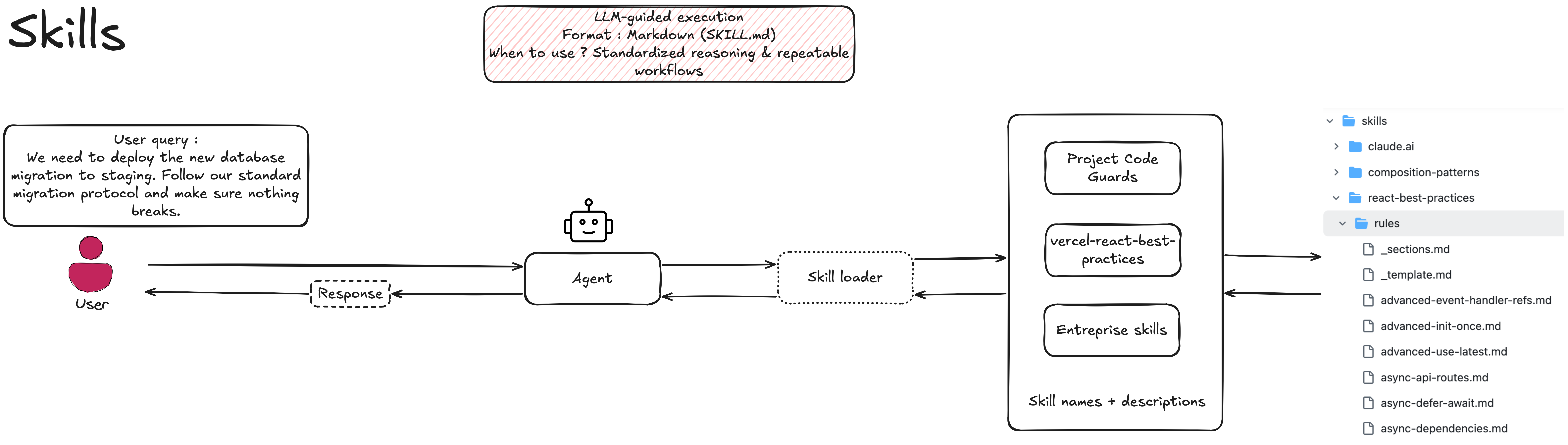
A Skill is essentially a static artifact, a curated markdown file or set of instructions. It teaches the agent the specific, opinionated workflow your team uses to solve a recurring problem, defining the procedural logic of the task.
Imagine your team has a strict process for database migrations. A Skill might look like this:
---
name: execute-db-migration
description: Use this skill when applying a new database migration in staging.
---
# Database Migration Protocol
1. **Pre-flight Check:** Query the `pg_stat_activity` table to ensure no long-running transactions are active.
2. **Backup:** Trigger a lightweight snapshot of the `users` and `transactions` tables.
3. **Execute:** Run the migration script located in`/migrations/pending`.
4. **Verify:** Check the application health endpoint to ensure no immediate regressions occurred.
This is lightweight, version-controlled, and encodes institutional knowledge. However, the Skill itself is just text; it cannot execute anything on its own.
MCP Servers: The Live Connection
An MCP Server is a live application that provides the technical interface to actually execute workflows against external data. Where a Skill is static, an MCP Server handles real-time data, authentication, and centralized governance.
To execute the database migration Skill above, the agent needs tools. An MCP server provides those structured tools:
For individual developers hacking in a local sandbox, you might be able to get away with just giving an agent a Skill and raw API keys to write its own scripts. But for an engineering organization, this is a security nightmare.
Skills provide judgment: They tell the agent when and why to trigger a snapshot.
MCP provides governed capability: It handles the server-side authentication, ensures the agent only has access to specific endpoints (limiting blast radius), and logs the interaction in your central observability stack.
To get the most out of AI agents, you need both: the institutional knowledge encoded in Skills, and the secure, observable execution layer provided by MCP.
The Next Evolution: Securing the Loop with Symbiotic Code
Understanding the agent loop reveals just how much autonomy these systems have. They are reading files, executing commands, and iterating based on raw outputs.
While most agents are designed purely for velocity, making it as fast as possible to go from prompt to code, this raw speed often comes at the cost of security. As we explored in our previous research, agents focused only on functionality frequently introduce subtle, exploitable vulnerabilities.
This is why we built Symbiotic Code.
We took the standard agent loop and rebuilt it to be secure by design. Instead of just looping through execution and observation, Symbiotic Code injects security pre-hooks before inference and verification post-hooks after every tool call. If the model generates an insecure patch, the loop catches it, triggers a deep remediation cycle, and forces the agent to fix its own vulnerability before it ever presents the code to you.
You get the power of the multi-turn agent loop, but with a hard guarantee that the output is secure.
Ready to unlock the productivity of AI coding agents without the security debt? Try Symbiotic Code today.
About the author
Salah-Eddine Alabouch
AI Engineer
Salah-Eddine Alabouch is an AI Engineer at Symbiotic Security with a strong focus on cybersecurity.
Related posts
Insights
November 26, 2024
Understanding the Impact & Resolution of the Critical AWS CDK Vulnerability
A critical AWS CDK vulnerability was found by researchers Itach and Kadkoda from the Aqua team. The flaw was serious - letting attackers potentially take over AWS accounts as admins if certain conditions lined up.
Exploring the Study: Security Degradation in Iterative AI Code Generation
The study “Security Degradation in Iterative AI Code Generation” made clear that more iteration on code using LLMs leads to more security vulnerabilities.

.png)